
Top Posts
Developer Workflows that Teams Trust: Avoid Pitfalls, Save Time, and Foster Alignment
The “right” developer workflow can drastically increase team alignment and productivity
Developer Workflows are Hard, but Solvable!
In my years working on and leading software engineering teams, I have used plenty of developer workflows or a development process as some call it. A good developer workflow can serve many valuable purposes for an engineering team. And they are at times mistakenly overlooked and underinvested in.In this post, I’ll discuss the importance of a developer workflow, pitfalls to avoid, and what’s worked for me throughout my career. There is not a one-size-fits-all approach, if you want a bespoke solution, please reach out and we will find what is best for your team.𝗪𝗵𝘆 𝗳𝗼𝗰𝘂𝘀 𝗼𝗻 𝗮 𝗱𝗲𝘃𝗲𝗹𝗼𝗽𝗲𝗿 𝘄𝗼𝗿𝗸𝗳𝗹𝗼𝘄
So why are developer workflows important?There are several valuable aspects of a good developer workflow. The “right” developer workflow makes things simpler and automation keeps things more accurate. Additionally, it should serve as a single source of truth. Anyone on the team (technical or not) can determine what anyone else is working on, via a self-serve model of just looking at the board, versus needing to ask someone.Furthermore, one could self-serve information about what work has recently been completed, launched, or signed off by stakeholders. Assuming due dates are being utilized (subject for another post) they can also see when the work is expected to be done.This minimizes wasted communication overhead. Rather than having engineers or product managers constantly pinging team members to check in on what they are working on and when it will be done, everyone can head to a single destination, which they all trust, to get the information they need.Freeing up this wasted communication time enables developers to solve more important problems and make better use of their time. It also reduces the amount of time spent on context switching.Another added benefit is that it minimizes bureaucracy, maintenance time, and unnecessary work. People are no longer responsible for chasing down everyone else on the team to figure out what they are all working on. It also can reduce time spent in meetings where people are simply giving updates, information that could be self-served asynchronously.With the “right” system, there can be a main hub for people to work from. This provides added clarity, direction, and simplicity resulting in a more efficient team!𝗣𝗶𝘁𝗳𝗮𝗹𝗹𝘀 𝘁𝗼 𝗮𝘃𝗼𝗶𝗱
There are several pitfalls that I’ve seen teams get caught in.Having a workflow that doesn’t clearly delineate who needs to take the next action is a common pitfall. This can happen because the workflow is too simple or too complicated.When the workflow is too simple, a deadlock can occur when team members are waiting on each other to complete their respective tasks, because they think it is someone else’s turn to act.When the workflow is too complicated, team members don’t know what’s going on and tend to rely on personal views that aren’t aligned with other team members, or worse get overwhelmed and stop using the tool altogether. Also, an overcomplicated workflow makes it harder for team members to remember what things mean, what, and whose turn it is to act. This almost always creates a cycle where tasks aren’t correctly updated, which leads to a lack of trust in the board.Another pitfall to avoid is having the board not be accurate. If the board is not updated correctly and consistently, people don’t trust it. When the team doesn’t trust it, there is little value in the board.The Broken Window Theory states that disorder flourishes when small problems aren’t addressed. It creates a cycle where some disorder leads to more disorder.This applies directly to a developer workflow, when team members don’t trust that the board is accurate, they are less likely to update their tasks.𝗪𝗵𝗮𝘁’𝘀 𝘄𝗼𝗿𝗸𝗲𝗱 𝗳𝗼𝗿 𝗺𝗲
I’ll give a brief outline of the various workflow statuses and then go into them more in-depth.These are the statuses in order:1 - To Do
2 - In Progress
3 - In Review
4 - In Stage
5 - In Prod
6 - Done𝟭 - 𝗧𝗼 𝗗𝗼
Tasks that haven’t been started yet. They enter this status as a result of planning or reprioritization. In a future post, I can go more in-depth into planning, sprints, grooming, and backlogs.𝟮 - 𝗜𝗻 𝗣𝗿𝗼𝗴𝗿𝗲𝘀𝘀
Tasks where the assignee has started the work. With integration, the task will be moved automatically into In Progress when an engineer makes a properly named branch in your VCS (Version Control System), e.g. GitHub.𝟯 - 𝗜𝗻 𝗥𝗲𝘃𝗶𝗲𝘄
A task moves to In Review when the development work is done and code review has begun. Again with integration, the task is moved here when a Pull Request (PR) is opened via automation.Pro Tip: When the code review is complete, automation can add a label or tag that indicates the task is merged. This label/tag allows people to quickly differentiate a task that is waiting on a review vs. one that is waiting on a deployment.𝟰 - 𝗦𝘁𝗮𝗴𝗲
When the code has been reviewed and merged, it is recommended to be deployed to a non-production environment (often called Stage). With integrations enabled, the task is automatically moved to In Stage once the CI/CD (Continuous Integration / Continuous Delivery) pipeline deploys to said environment.𝟱 - 𝗣𝗿𝗼𝗱
A task moves to In Prod after the code has been signed off in Stage. At this point, the code is ready for a production deployment. Through integration, tasks will be automatically moved to this status when the CI/CD (Continuous Integration / Continuous Delivery) pipeline deploys to production.𝟲 - 𝗗𝗼𝗻𝗲
Finally, a task moves into the Done status when the Product Owner signs off in production and manually moves the task from In Prod to Done.𝗪𝗵𝘆 𝗶𝘁 𝘄𝗼𝗿𝗸𝘀
This developer workflow has only 6 statuses. Compared to other approaches, it’s on the lighter side, while still providing valuable granularity. With this simple workflow, team members can understand the process quickly and reach alignment.Automation helps to minimize the manual work that goes into maintaining the statuses of the tasks. Tasks typically aren’t interacted with manually, with most transitions automated. The manual actions are putting tasks into the To Do status after planning and later the Product Owner moves the task to Done after signing off on it in production.This lack of manual interaction gives the team confidence that the statuses are correct and true. When the team trusts that the tasks are accurately accounted for, they don’t have to waste time tracking things down and trying to find out what is actually going on. Earlier, we discussed The Broken Windows Theory. Here, the other side of that theory is being leveraged, when the team maintains an accurate board, individual members feel responsible for keeping the board accurate.𝗪𝗵𝗮𝘁 𝗵𝗮𝘀 𝗮𝗻𝗱 𝗵𝗮𝘀 𝗻𝗼𝘁 𝘄𝗼𝗿𝗸𝗲𝗱 𝗳𝗼𝗿 𝘆𝗼𝘂?𝗧𝗼𝗽𝗶𝗰𝘀 𝗻𝗼𝘁 𝗰𝗼𝘃𝗲𝗿𝗲𝗱
In this post, I focused only on a developer workflow.There are plenty of related topics that I could go into in another post:- Work estimation
- Due dates and tracking them for accountability
- Planning, sprints, grooming, and backlogs.
- QA team integration with the team and board
- How people (within or outside of the team) can bring things to the team’s attention (bugs, features, etc.)
- When to release (to Stage, Prod, …)
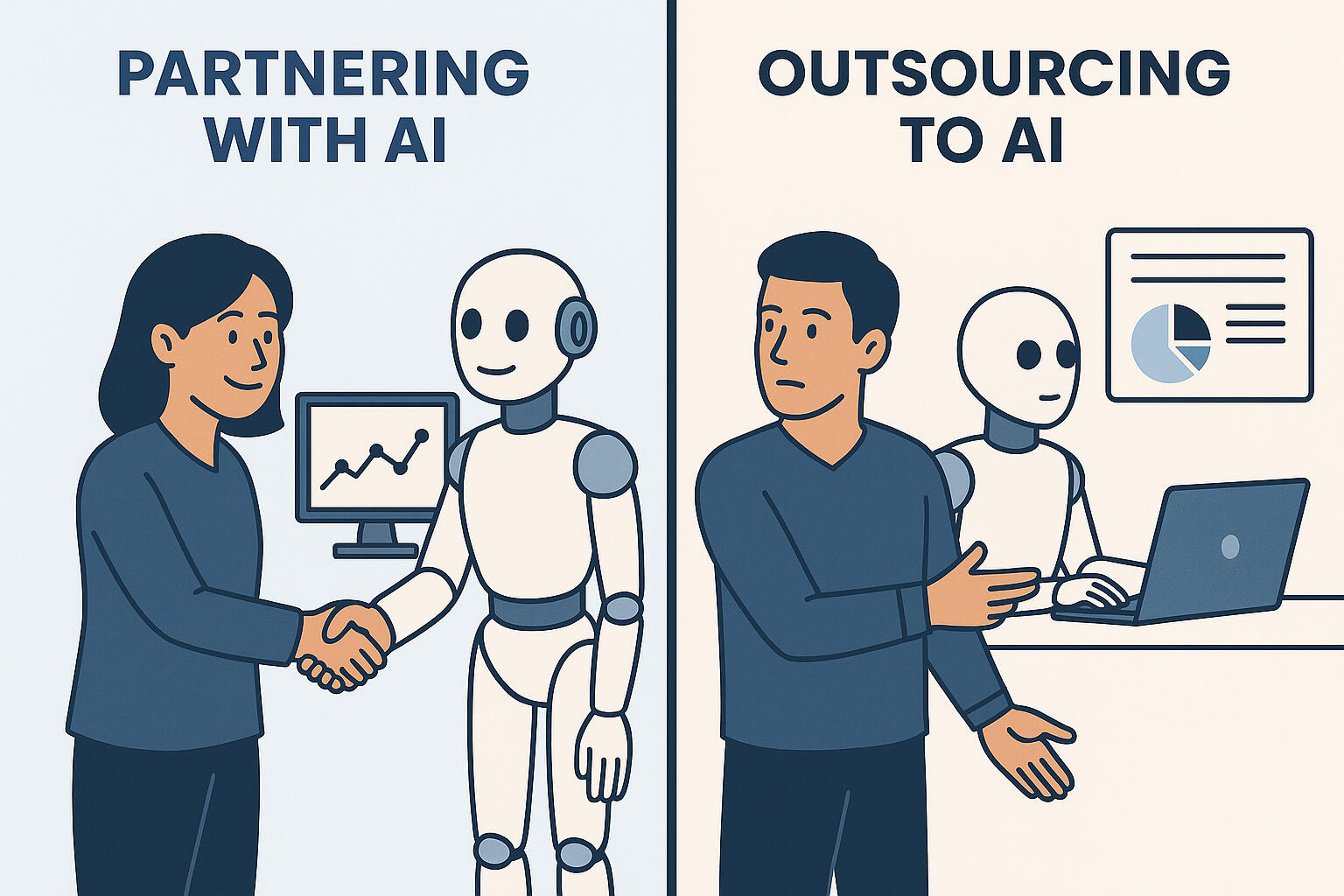
𝗣𝗮𝗿𝘁𝗻𝗲𝗿𝗶𝗻𝗴 𝘄𝗶𝘁𝗵 𝗔𝗜 𝘃𝘀 𝗢𝘂𝘁𝘀𝗼𝘂𝗿𝗰𝗶𝗻𝗴 𝘁𝗼 𝗔𝗜
There’s a growing temptation to treat AI like a direct report:
“Hand off a task, get output, maybe test it, and move on.”
Developer Workflows are Hard, but Solvable!
Great engineering isn’t about delegation. It’s about understanding systems, constraints, and edge casesThe new 𝟭𝟬𝘅 𝗲𝗻𝗴𝗶𝗻𝗲𝗲𝗿 partners with AI:
• Uses it to 𝗮𝗰𝗰𝗲𝗹𝗲𝗿𝗮𝘁𝗲, not own the architecture
• 𝗥𝗲𝘃𝗶𝗲𝘄𝘀 the outputs, knowing AI can hallucinate or oversimplify
• 𝗨𝗻𝗱𝗲𝗿𝘀𝘁𝗮𝗻𝗱𝘀 the outputs, never answering “I don't know, the AI did it”Engineering is about leverage. Partnering with AI means using it to free up focus — not to abdicate responsibility.✅ Partnering with AI = “Collaborate and refine.”
🚫 Outsourcing to AI = “Assign and forget.”The engineers and teams that treat AI as a partner — not a direct report — will ship with higher quality, better understanding, and be faster over the medium and long run.Are you 𝘁𝗵𝗲 𝗻𝗲𝘄 𝟭𝟬𝘅 𝗲𝗻𝗴𝗶𝗻𝗲𝗲𝗿?
Next Post ...
Laoreet semper tempus lectus nascetur nisl iaculis enim. Lacus pharetra nibh mollis in aliquet accumsan tellus. Varius ullamcorper at montes proto aenean dignissim mauris dictum sapien suspendisse.Consectetur pellentesque in mauris scelerisque placerat neque nullam tellus vis ligula vitae euismod purus auctor nisl mauris tempor urna sollicitudin ut felis.Ridiculus commodo erat convallis lacinia eget augue suspendisse vivamus orci.